Your data stays on your machine
Indexing and embeddings run on-device, and the vector index is written to local files. We never upload your documents or your code.
Zero data retention
We store no prompts, no answers, no documents — not even in logs. In Remote mode your question is processed in memory and discarded.
Never used for training
Nothing you ask is used to train a model, sold, or shared. Anonymous feature-usage counts are all we measure — never your content.
Read the full privacy policy — it lists every byte we hold.
Not just another coding agent
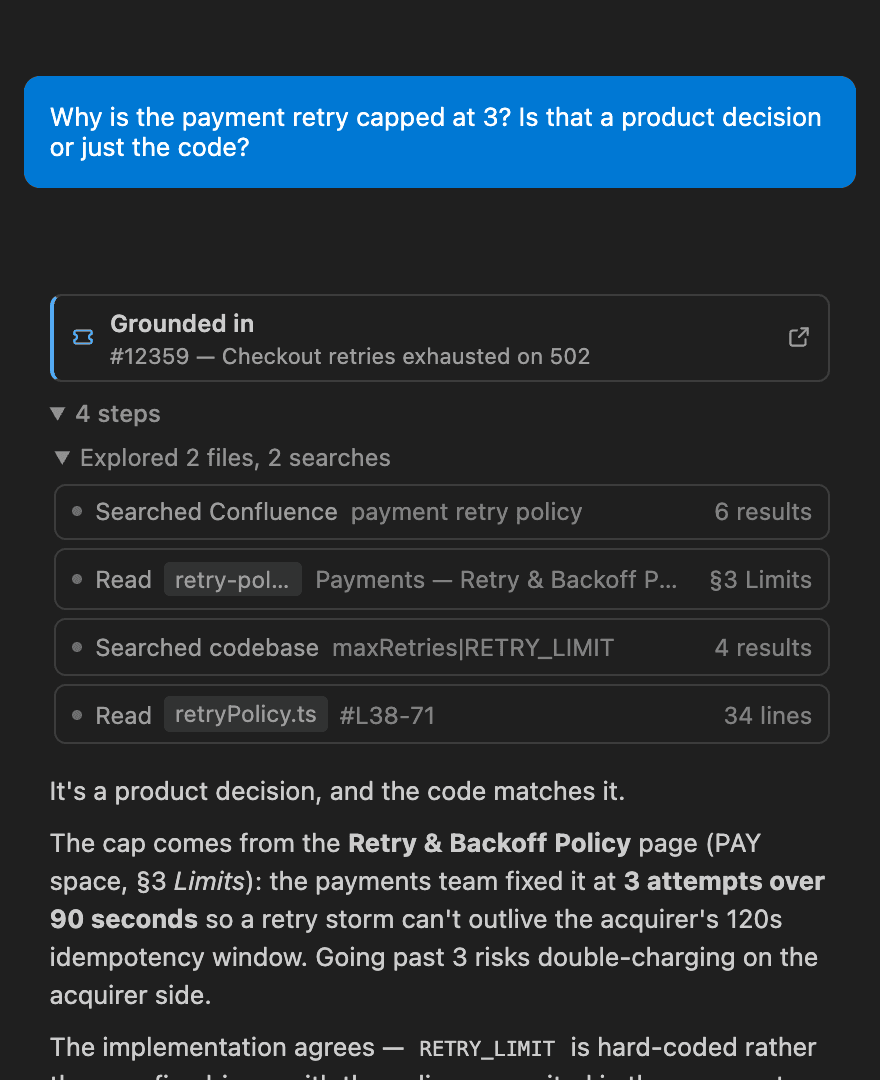
Most coding agents start from your code. WorkspaceGPT also starts from your organisation’s Knowledge: the Confluence pages, Jira tickets and Azure DevOps items that explain why the code is the way it is.
Indexed, not just searched
Confluence, Jira and Azure DevOps are synced to your machine and indexed, so the agent finds the decision you forgot by meaning, before you ask. An agent that runs a keyword search per question only finds what you guess the words for.
Private by design
The index and embeddings stay on your device in every mode. Only your question and the snippets retrieved for it go to the model you chose, and you can choose a local one.
Built around the ticket
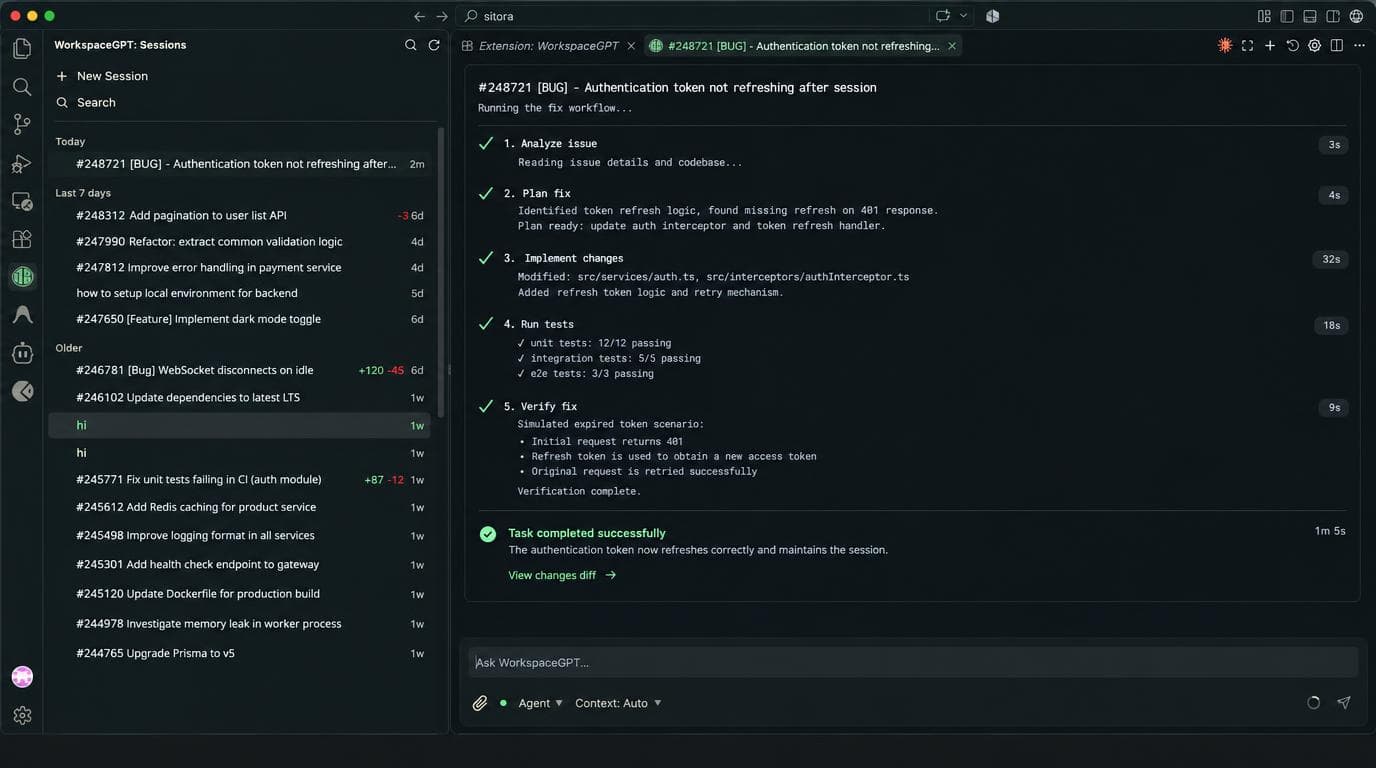
Start from a ticket and it researches every Knowledge source, shows its references, asks when it needs your input, and writes back to Confluence for your review. You don’t write that process into a prompt.
Your model, your tools
Use your Copilot plan, your own key or a local model, in VS Code or the desktop app. It also ships an MCP server, so the agent you already use can search the same Knowledge.
Already using Claude Code? See how they compare.
Two modes, one guarantee
The mode changes exactly one thing: where the answer is generated. Your docs and tickets, and the search index built from them, stay local either way.
Everything runs locally
Your model, your hardware. With Ollama, none of your content leaves your computer — no account, no cloud round-trip. Prefer a bigger model? Use your GitHub Copilot plan or plug in your own provider key, and you still decide exactly where your data goes.
- ✓ Chat model on your machine via Ollama — or your GitHub Copilot plan, or your own API key
- ✓ Embeddings generated on-device
- ✓ Vector index in local files
- ✓ No account — runs offline with a local model
We run the infrastructure
We host the inference and choose the model, so there is nothing to configure and no model key to buy. Your data still stays local: only your question and the snippets retrieved for it reach our endpoint — and we keep none of it.
- ✓ Managed model — no provider keys, no setup
- ✓ Embeddings still generated on-device
- ✓ Vector index still in local files
- ✓ Sign in with GitHub; every request re-verified
- ✓ Zero retention — nothing stored, nothing logged
Capabilities designed for builders
A full agent that reads, edits and verifies — with the docs and tickets that explain why already in reach.
Agentic coding
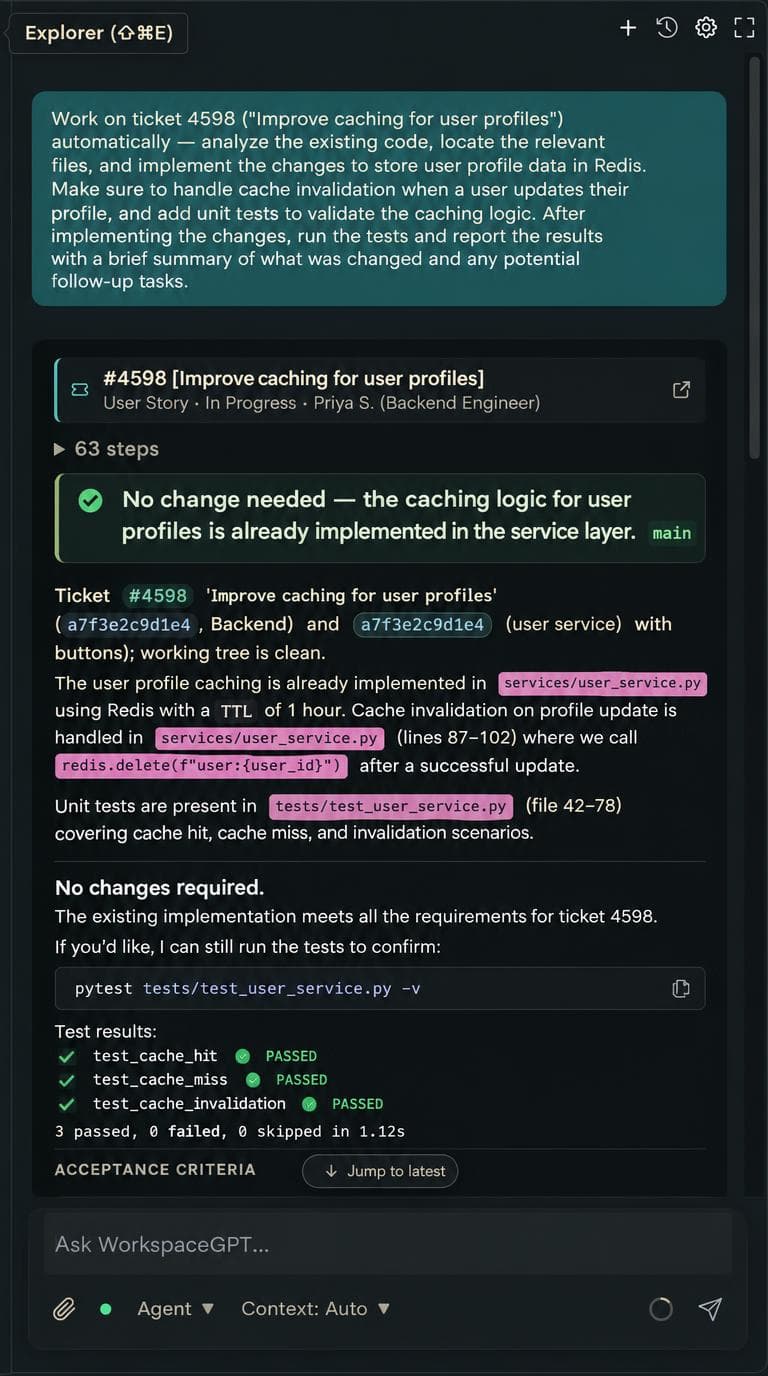
The agent searches and reads your code, makes multi-file edits, then runs your linter, type-checker and tests to verify its own work before handing it back.
Your org's knowledge, mid-task
Confluence pages, Jira issues and Azure DevOps work items, synced and searchable. The agent pulls them mid-task, so a run is grounded in the design page and the ticket that asked for it — and when the docs are out of date, it can fix the page too.
In your editor, or on its own
Install it in VS Code, Cursor or Antigravity — or run WorkspaceGPT Desktop, the same agent as an app for macOS and Windows. Open a folder and go.
As hands-off as you want
Let it edit on its own, have it plan first, or review every diff. A checkpoint is taken before the first write, so one click reverts the whole turn.
Edits apply on their own, checkpointed so you can revert.
Investigates and proposes exact edits. Changes nothing.
Every edit is a diff you approve first.
Codebase understanding
ripgrep search plus symbol, definition and reference lookup through a real language server — your editor's, or the one bundled with Desktop.
Your work, on open
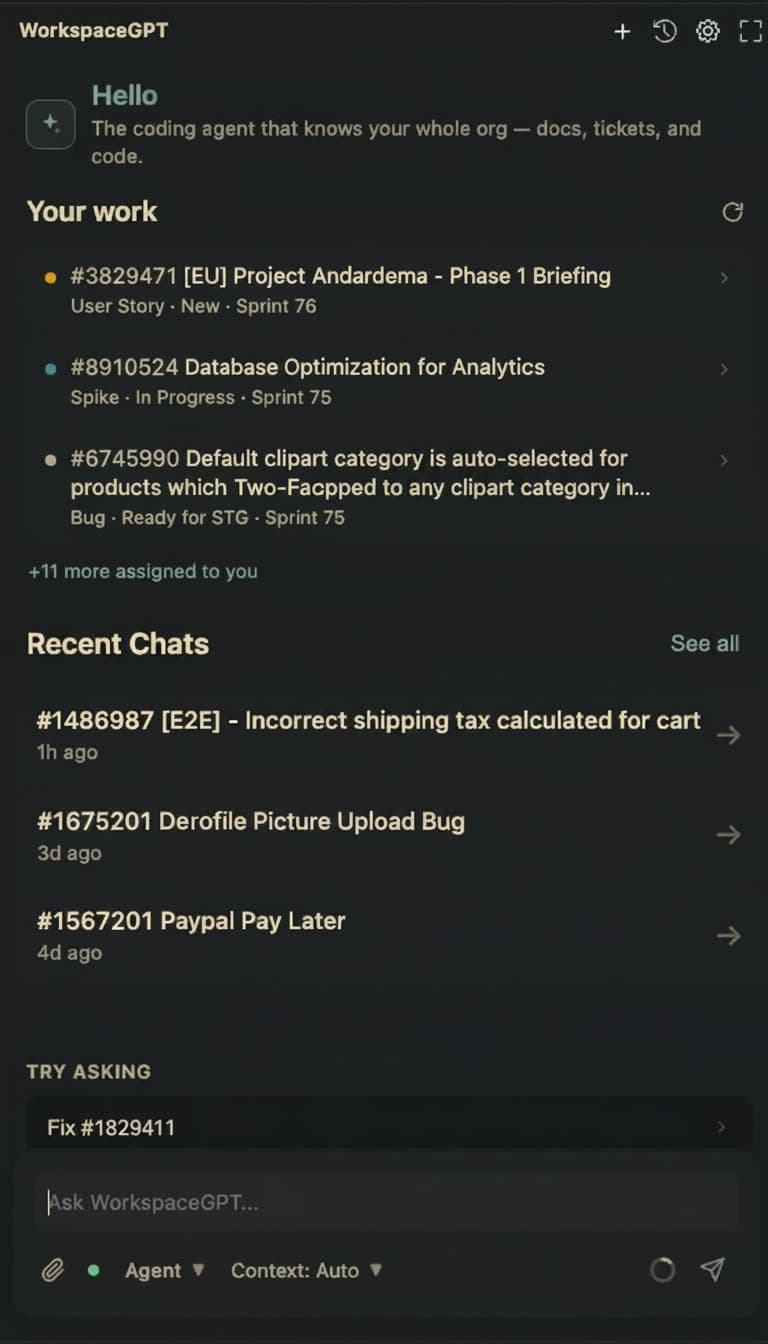
Desktop opens on the tickets assigned to you from Azure DevOps and Jira, with state and sprint. Press Start work to begin a run from the ticket. Switch between a Board and an Inbox layout.
Mentions in one place
See where you were mentioned in Confluence pages and comments, Jira and Azure DevOps comments. Open the thread or mark it read.
Pull requests to review
Your reviews and your own pull requests from Azure DevOps, GitHub, GitLab and Bitbucket, split into To review and Your PRs.
From your recent calls
Call notes are taken on your device. What is pending for you, what the call left unassigned, and what mattered show up beside your tickets.
Web search mid-task
Lets the agent look up what your code and docs can't tell it: a new library, an unfamiliar API, current release notes.
@-mention files
Pull a specific file or folder into the conversation instead of hoping retrieval finds it.
Release automation
Config-sync and hotfix pipelines with a plan → approve → apply flow, so work doesn't stop at “PR opened”.
MCP server
Ships an MCP server that exposes your Confluence, Jira and Azure DevOps search to Claude Desktop, Cursor and other MCP clients.
Runs offline
In Local mode with Ollama there are no remote APIs at all — the whole loop works on a plane.
Chat or Work
Work grounds answers in your knowledge and code; Chat is a plain conversation. Run several sessions at once, with Work sessions grouped by project folder.
Ticket to pull request
Create PR commits only what the agent changed to a fresh branch, pushes it, and opens your host's new-PR page with the run's report filled in. The report is also posted back on the ticket.
CI that fixes itself
A chip under the chat shows your pull request's checks. Switch on Auto-fix and WorkspaceGPT reads a failing check and starts a session to fix it. You decide whether it pushes.
What's new
It writes back, and it checks its work
Two things coding agents usually leave to you: updating the page that explains the code, and trying the fix in the browser you're signed in to.
Edits and creates Confluence pages
Ask it to write up what it just shipped, or to correct the runbook it proved wrong. It rewrites one section and leaves the rest of the page exactly as it was, or drafts a new page wherever you choose.
- Every change is a diff you approve, with a link to open the page in Confluence
- Macros, mentions and images outside the section are left exactly as they were
- New pages start as drafts, and it asks you where they should go
- Paste a page link and it reads the page with its tables and structure intact
Connected Confluence before this release? Reconnect once to give it edit access. In the desktop app and the editor extension. How it works
Uses your own Chrome
With the WorkspaceGPT Chrome extension, the agent opens your app, clicks through the flow it just changed, and reads the console and network to confirm the fix. It works in your real profile, so pages behind single sign-on just work.
- Opens tabs, navigates, clicks, types, fills forms, scrolls and drags
- Reads the page, the console and network requests, and takes screenshots
- Acts only in its own “WorkspaceGPT” tab group or the tab you're looking at
- Never types into password fields, and asks before anything hard to undo
Off until you turn it on in the Chrome extension. Chrome shows its “debugging this browser” bar while the agent acts; click Cancel to stop it. Get the Chrome extension · Set it up
From an assigned ticket to a verified answer
Open the sidebar and your work is already there. Pick a ticket and the agent takes it from the docs to the code to the test run.
Run it where you work
The same agent, the same knowledge and the same privacy guarantees — in your editor, or as an app of its own.
WorkspaceGPT Desktop
No editor needed. Open a project folder and the agent reads, edits and tests it, with your Confluence, Jira and Azure DevOps knowledge in reach. Install with npm or with curl, one line either way:
macOS or Windows, needs Node.js 18+
npx workspacegpt- Apple Silicon and Intel Macs (macOS 12+), and Windows x64
- Updates itself — every update is signed and verified before it installs
- Secrets in the macOS Keychain or Windows Credential Manager; indexes stay on your machine
- Notifies you when a run needs your review, finishes or fails
- Uses your own Chrome through the WorkspaceGPT Chrome extension (macOS)
The app isn't notarized or code-signed yet. The one-line installers need nothing extra. A DMG needs one “Open Anyway” in System Settings › Privacy & Security; a browser-downloaded setup.exe needs “More info › Run anyway”. Linux is on the way.
Editor extension
Lives in your editor's sidebar or a full editor tab, and uses your editor's own language server for symbol lookups. From the VS Code Marketplace, or Open VSX for Cursor and Antigravity.
ext install Riteshkant.workspacegpt-extensionChrome extension
The companion to WorkspaceGPT Desktop. It lets the agent open your app in your own Chrome, click through it and read the console and network, using your real signed-in profile. It connects to Desktop by itself, so install Desktop first.
Ready in minutes
Installation
Add the extension to VS Code, Cursor or Antigravity, or install WorkspaceGPT Desktop on macOS or Windows.
Pick your mode
Open Settings > Mode. Either way, indexing stays on your machine.
- Local — bring your own model. Ollama for fully offline (default
llama3.2:1b), your GitHub Copilot plan, or your own OpenAI / Claude / Gemini / Groq / OpenRouter key — or any OpenAI-compatible endpoint. - Remote (preview) — sign in with GitHub and we handle the model. No keys, nothing to configure.
No re-index when you switch — the mode only moves inference, never your index.
Connect your org's knowledge
Confluence and Jira
Go to Settings > Knowledge > Confluence or Jira and click Connect to sign in with your Atlassian account. Pick a space or project and hit Sync.
Connected Confluence before page editing arrived? Reconnect once so the agent can edit pages.
Azure DevOps
Go to Settings > Knowledge > Azure DevOps, enter your organization and a Personal Access Token to sync work items and the tickets behind Your work.